
1. Introduction: Why Faceted Navigation Is Important
Faceted navigation plays a big role in helping users quickly find what they’re looking for on a website. If you’ve ever used filters like price, size, color, rating, material, or brand on an e-commerce site, you’ve already experienced faceted navigation in action. It makes browsing easier, saves time, and helps visitors reach the right result without scrolling endlessly.
But while faceted navigation improves user experience, it can also create hidden SEO problems if it’s not managed properly. Every filter a user applies can generate a new URL, and sometimes thousands of these filtered pages start appearing in search engines. This can lead to duplicate content, wasted crawl budget, and indexing issues, all of which can negatively affect SEO performance.
That’s why understanding faceted navigation is so important. When you know how it works and how to optimize it, you can enjoy the benefits of better user experience without compromising your SEO. Faceted navigation becomes a powerful tool only when you balance user needs with search engine guidelines. Without the right strategy, it can silently weaken your rankings even when your website looks perfectly fine on the surface. That’s why it’s crucial to treat faceted navigation as a technical SEO priority, not just a design feature.
Table of Contents
2. Defining Faceted Navigation
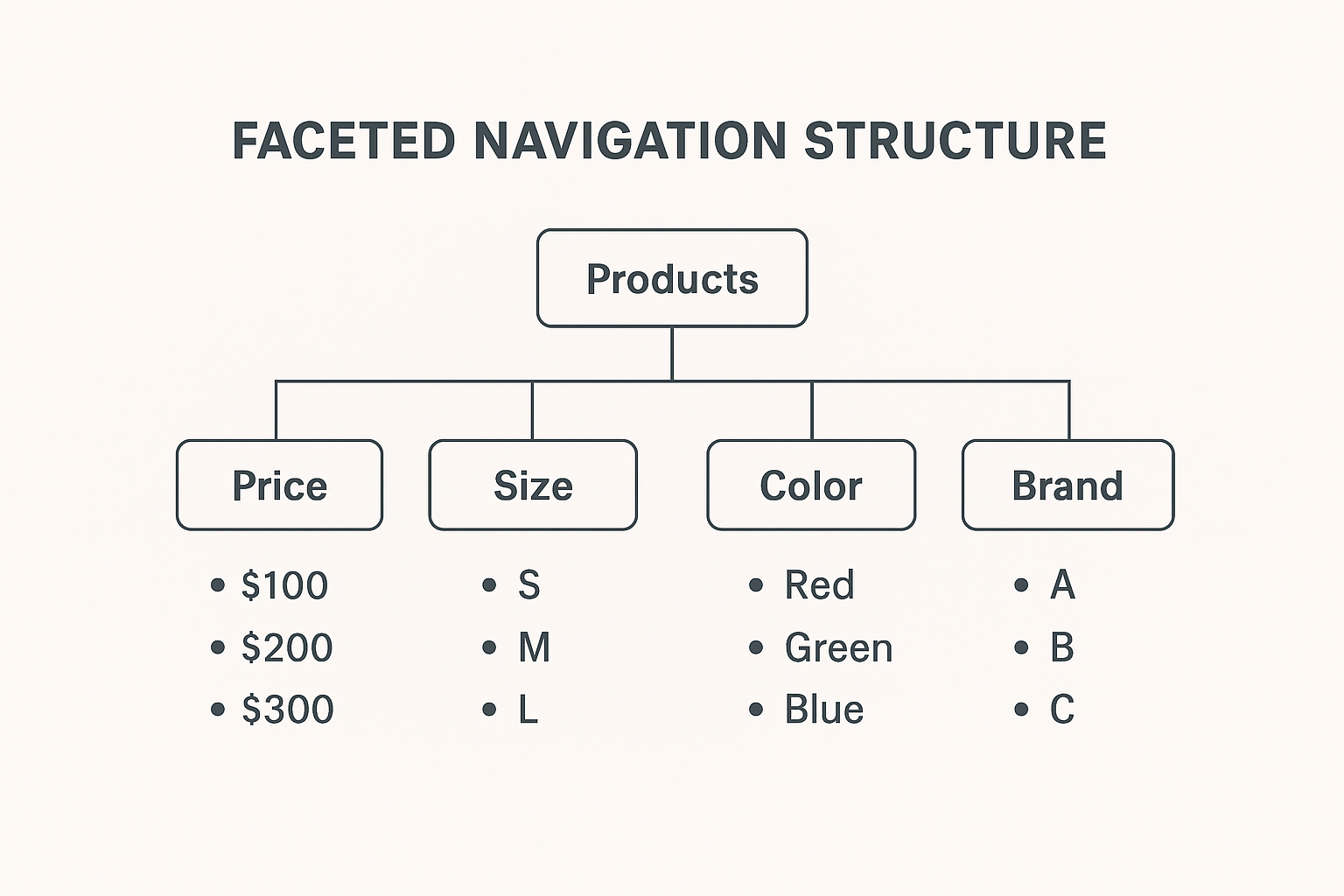
Faceted navigation is a filtering system that allows users to narrow down large sets of products or content based on different attributes like color, brand, price, size, material, ratings, or categories. Instead of scrolling through hundreds of options, users can apply multiple filters to reach the most relevant results.
This style of navigation is widely used on e-commerce sites, real estate platforms, job portals, travel websites, and even large blogs with extensive article collections.
Faceted navigation improves browsing comfort but also generates many URL combinations. These extra URLs are useful for users but can create challenges for search engines if the structure is not managed carefully.
2.1 What Readers Will Learn
Here, you will understand the core idea of faceted navigation and how filter-based browsing affects both users and search engines.
You will learn:
- How faceted navigation works behind the scenes
- How filters generate different URL variations
- Why search engines struggle with too many filtered pages
- Where faceted navigation is commonly used
- How it impacts SEO and user interactions
This gives you a strong base before moving into the deeper SEO aspects later in the blog.
2.2 Why It Matters for SEO and User Experience
Faceted navigation affects two major areas of a website: how people browse and how search engines crawl.
From a user perspective, filters make it much easier to find relevant results quickly. This leads to better engagement, more time spent on the website, and higher chances of conversions.
From a search engine perspective, multiple filters generate countless unique URLs. When these URLs get crawled and indexed without control, they can cause:
- Duplicate and thin content
- Overuse of the crawl budget
- Unnecessary indexation of low-value pages
- Complicated URL structures
This makes faceted navigation a critical area to manage carefully. When optimized correctly, it supports both user experience and SEO growth.
2.3 Difference Between Standard and Faceted Navigation
Standard navigation follows a fixed, step-by-step structure where users move from a main category to a subcategory and then to a product or article. Faceted navigation gives users the freedom to apply different filters in any order, making the browsing experience more flexible.
This flexibility is helpful for users but creates more complexity for SEO because each filter combination creates a new URL.
Standard Navigation vs. Faceted Navigation
| Feature | Standard Navigation | Faceted Navigation |
| Structure | Fixed and hierarchical | Flexible and multi-filter browsing |
| User Flow | One-directional | Multi-directional |
| URL Count | Limited | Very high |
| Ideal For | Smaller websites | Large product or content catalogues |
| SEO Risk | Low | High, needs control |
2.4 Examples from E-commerce and Content Websites
Here are clear examples of how faceted navigation works across different industries:
E-commerce Platforms:
- Filters such as brand, size, material, color, discount, rating
- A buyer can choose “Black Shoes + Size 8 + Under ₹3000” and instantly get refined results
Travel Websites:
- Filters like location, price range, hotel type, star rating, amenities, reviews
- Users can narrow down hotels based on their preferences in seconds
Job Portals:
- Filters such as experience, salary, job type, company, skills, location
- Job seekers find relevant openings faster
Content Websites:
- Filters based on topics, categories, authors, publish date, popularity
- Readers can quickly explore specific types of articles
These real-life situations show how faceted navigation helps users while also creating technical challenges for SEO.
3. How Faceted Navigation Impacts User Experience
Faceted navigation transforms the way users interact with a website by giving them more control over how they browse. Instead of following a fixed path, users can shape their own search journey based on what matters most to them. This makes the website feel more intuitive and tailored to their preferences.
A well-designed filtering system also reduces the cognitive load on users. When people don’t feel overwhelmed by too many choices, they naturally make decisions faster and feel more satisfied with the browsing experience. This kind of smooth interaction builds trust and keeps users coming back.
3.1 Helping Users Find Products or Content Faster
Faceted navigation speeds up discovery by removing unnecessary steps from the search process. Users don’t have to switch between multiple pages or categories, they can narrow down results in one place.
For example, a shopper looking for a laptop with “16GB RAM, SSD Storage, and under ₹50,000” can apply these filters instantly instead of checking each model individually. This convenience makes the website feel more efficient and user-friendly.
It also helps users who have very specific preferences or are in a hurry. When results become more precise with each filter applied, decision-making becomes effortless. This improves the overall flow and reduces user frustration.
3.2 Reducing Bounce Rate and Increasing Engagement
When visitors find relevant results without confusion, they are more likely to stay longer and explore deeper. Faceted navigation supports this by presenting options that match the user’s intent right from the first interaction.
A website that understands what the user is looking for encourages them to continue browsing. This leads to:
- More product comparisons
- Higher chances of adding items to wishlist or cart
- More page views per session
- Better interaction with filters and categories
- Increased trust in the website’s structure
By eliminating that overwhelming “too many choices” feeling, faceted navigation keeps users focused and engaged. This natural flow helps lower the bounce rate and strengthens your site’s chances of converting visitors into customers.
4. The Role of Faceted Navigation in SEO
Faceted navigation has a strong influence on how search engines understand, crawl, and rank a website. While users benefit from flexible filtering, search engines see something very different behind the scenes, multiple URLs created from every filter combination.
These extra URLs may look similar, share the same content, or differ only slightly. This creates complexity for search engines, making it harder for them to know which pages are important and which ones should be ignored. Because of this, faceted navigation must be handled with a careful SEO strategy to prevent confusion and loss of ranking potential.
4.1 How Search Engines View Faceted Pages
Search engines analyze faceted pages differently than regular category or product pages. For them, each filtered page is a separate URL that needs crawling and evaluation. Even if the content looks almost identical to the main category page, search engines still treat it as a unique page.
This leads to several issues:
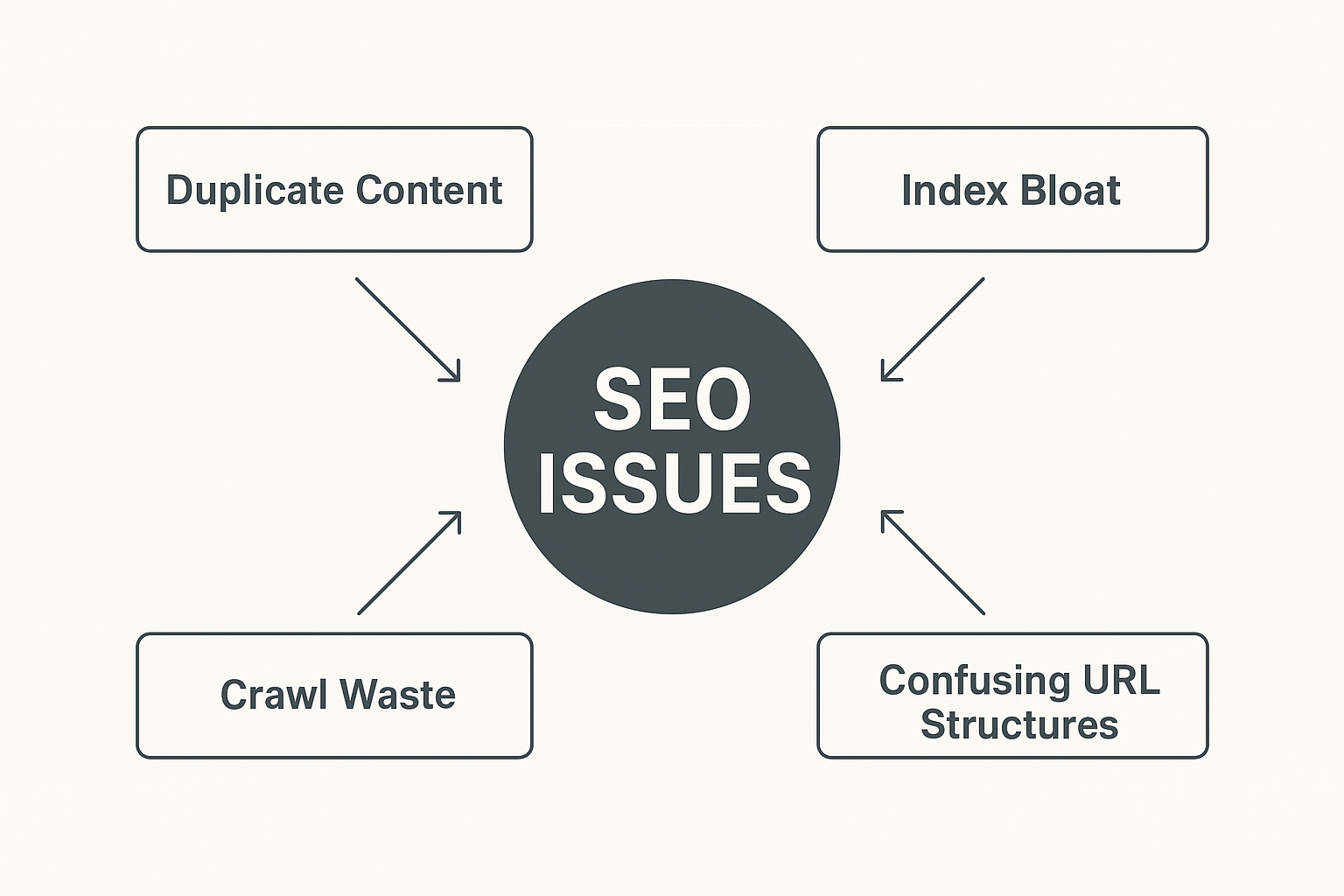
- Crawl Waste: Search engines may spend time crawling thousands of similar faceted URLs instead of your most valuable pages.
- Duplicate Signals: Many faceted pages show the same products with slight variations. This makes it hard for search engines to decide which version is the strongest.
- Diluted Authority: Link equity gets spread across multiple filtered URLs instead of staying concentrated on the core category page.
- Conflicting Relevance Signals: Search engines may struggle to understand which version should appear in search results.
To a search engine, faceted pages are not “filters”, they are separate pages that require guidance through canonical tags, robots rules, and proper parameter handling.
4.2 Indexing Challenges and Opportunities
Faceted navigation brings both risks and opportunities when it comes to indexing. If filters generate too many similar URLs, search engines may struggle to identify which version should be indexed, leading to wasted crawl activity. At the same time, important category pages may get less visibility because crawlers spend more time on unnecessary filtered URLs. However, when filters are handled smartly, you can guide search engines toward high-value pages and improve the way your site appears in search results. This creates a chance to capture long-tail keywords and deliver more targeted content to users.
Challenges:
- Over-indexing: Search engines might index thousands of unnecessary filtered pages, crowding out your important URLs.
- Thin Content Pages: Some filtered pages may show only 1–2 products, creating pages that provide low value.
- Parameter Overload: URLs with parameters like ?color=black&size=small&discount=true can become messy and confusing for crawlers.
- Keyword Cannibalization: Multiple filtered pages may compete for the same keywords, making it harder to rank.
However, when managed properly, faceted navigation can also create SEO advantages.
Opportunities:
- High-Intent Landing Pages: Some filtered pages can match ultra-specific search queries, such as “red cotton kurtis under 999.”
- Better Internal Linking: Filters help surface deeper products or categories, distributing visibility across the site.
- Improved Crawl Path: When organized correctly, faceted navigation guides search engines to understand the full depth of your content.
The key is to decide which filtered pages deserve indexing and which ones should be blocked or controlled. Good faceted navigation doesn’t eliminate options, it guides search engines to focus on the pages that truly matter.
5. Common Problems Caused by Poor Faceted Navigation
When faceted navigation is not handled properly, it can create several SEO issues that quietly weaken a website’s performance. Filters may look helpful on the front end, but behind the scenes they can create hundreds or even thousands of unnecessary URLs. These pages often carry similar or overlapping content, which makes it harder for search engines to understand which version is important. Over time, this leads to ranking drops, slower crawling, and a messy site structure that affects both SEO and user experience.
5.1 Duplicate Content Issues
One of the biggest problems with poorly managed facets is duplicate content. Multiple filter combinations often lead to pages showing the same products or information. This creates confusion for search engines because they see many pages with almost identical value. As a result, ranking signals get divided among those URLs instead of being concentrated on a single, strong page. This can weaken your overall search visibility and reduce the chances of ranking higher for important keywords.
5.2 Crawl Budget Wastage
Every website has a limited crawl budget, meaning search engines can only crawl a certain number of pages at a time. Faceted navigation can generate thousands of useless URLs, and crawlers may waste their time going through them instead of focusing on your main category or product pages. When this happens, important pages may be crawled less often, slowing down indexing and delaying updates in search results. Over time, this directly impacts performance and visibility.
5.3 Confusing URL Structures
Filters and combinations can create long, complex, and unreadable URLs. These confusing URLs make it difficult for search engines to understand the page’s purpose and hierarchy. Visitors may also feel uncertain about sharing or bookmarking such URLs because they look cluttered and untrustworthy. A disorganized URL structure also weakens internal linking, which further reduces crawling efficiency and SEO strength. Keeping URLs clean and meaningful is essential for maintaining a healthy site architecture.
6. Strategies to Optimize Faceted Navigation for Search Engines
Optimizing faceted navigation is essential for keeping your website clean, crawlable, and search-friendly. Filters help users narrow down results, but they also create many new URLs that may not need to appear in search engines. When these URLs are not controlled, they can cause duplicate content, indexing issues, and unnecessary crawling. By applying the right strategies, you can maintain a great user experience while ensuring search engines only access valuable pages. The goal is simple: allow helpful, high-intent filtered pages to be indexed and stop low-value ones from cluttering your SEO.
6.1 Implementing Canonical Tags
Canonical tags play a crucial role in telling search engines which pages are the “main” versions and which ones are variations. When users apply different filters, the content usually stays the same but the URL changes. This can confuse search engines and split ranking power across multiple URLs. By placing a canonical tag that points back to the main category page, you ensure that:
- Only the primary page gets credit for ranking signals
- Filtered URLs don’t compete with each other
- Duplicate or similar content is grouped under one strong page
- Your category pages remain authoritative and consistent
This approach helps search engines stay focused while still allowing users to filter however they like. Canonical tags don’t stop crawling, but they guide indexing in the right direction.
6.2 Using Robots.txt and Noindex Where Needed
Some filtered pages provide no SEO value at all, and allowing them to be crawled only wastes time and resources. Examples include pages filtered by color, size, or sort order. These pages don’t match real search queries and rarely offer unique value. By using robots.txt or noindex for such filter types, you prevent them from entering the search index.
This approach helps by:
- Protecting your crawl budget from useless URLs
- Ensuring important pages are crawled more frequently
- Keeping search results clean and meaningful
- Avoiding index overload with thousands of low-quality URLs
Blocking or noindexing selective filters is one of the most effective ways to maintain a clean SEO structure without affecting the user-facing experience.
6.3 Prioritizing Important Filters
Not all filters are equal. Some filters are genuinely useful for both users and search engines. For example, filters based on brand, price range, or material often match real search queries like:
- “Nike running shoes under 5000”
- “Wooden dining table material oak”
- “Affordable laptops by brand”
By identifying which filters have search demand, you can allow these URLs to be indexed strategically. This method can help you capture long-tail keywords, improve visibility for niche queries, and offer more relevant pages for users.
Prioritizing filters means:
- Choosing only high-value facets for crawling
- Allowing selective indexing of useful combinations
- Keeping your site architecture organized
- Ensuring search engines discover pages that support conversions
This targeted approach strengthens both SEO performance and user satisfaction because the most relevant filtered pages can appear directly in search results.
7. Tools and Techniques to Manage Faceted SEO Issues
Managing faceted navigation becomes much easier when you use the right tools to monitor crawling, indexing, and duplicate URLs. Faceted SEO problems often hide deep inside a site’s structure, so relying on data and technical tools helps you catch issues early. These tools show you how search engines interact with your filtered URLs, which pages they are indexing, and where your crawl budget is being wasted. With continuous monitoring, you can keep your navigation clean, controlled, and aligned with your SEO goals.
7.1 Google Search Console Insights
Google Search Console is one of the most valuable tools for identifying problems caused by faceted navigation. It helps you see which filtered URLs are being crawled or indexed unexpectedly. In the Pages report, you can spot patterns like duplicate pages, soft 404s, or URLs that shouldn’t be indexed. The Crawl Stats report shows how much time Googlebot spends on your site and whether unnecessary URLs are consuming crawl budget. By using these insights, you can decide which filters need canonical tags, noindex rules, or crawl restrictions.
7.2 SEO Audit Tools
SEO tools such as Screaming Frog, Sitebulb, Ahrefs, and SEMrush are extremely helpful for auditing faceted navigation. These tools crawl your website in a similar way to search engines and highlight issues like duplicate content, thin pages, parameter-based URLs, or excessively long URL chains. They also help you visualize URL patterns created by filters, making it easier to identify which facets are generating low-value pages. With this data, you can adjust your SEO strategy and decide how to control, block, or optimize specific filter combinations.
7.3 Monitoring Crawl and Indexing
Continuous monitoring is essential to ensure that faceted navigation remains under control over time. Search engines revisit your website regularly, and new URLs may get generated as products or content change. Tracking crawl and indexing patterns allows you to catch unexpected issues before they grow. By reviewing server logs, you can see how search bots move through your site and whether they are spending time on pages that do not add value. Regular reviews help maintain a clean structure, protect your crawl budget, and prevent filtered URLs from slipping into the index accidentally.
8. Key Takeaways: Boosting SEO with Smart Navigation
Smart faceted navigation can completely change how both users and search engines experience your website. When your filters are clean, controlled, and aligned with search intent, your pages become easier to crawl, faster to index, and more relevant to users. Instead of overwhelming search engines with thousands of unnecessary URLs, you guide them toward the pages that actually matter. This balance between user experience and technical SEO builds a strong foundation for long-term visibility and better site performance.
8.1 Quick Improvements You Can Apply Now
Before making any big technical changes, you can start improving your faceted navigation with a few simple steps. These small actions help you quickly reduce indexing mistakes and keep harmful URLs out of search engines. Even basic updates can prevent duplicate content problems and improve crawl efficiency. The goal is to clean up your filtered pages so search engines are guided toward the right URLs instead of getting lost in unnecessary combinations.
- Add canonical tags to filtered URLs so search engines always understand which page is the primary version.
- Block non-valuable filters such as color, size, or random sorting options that don’t match real search intent.
- Review your Google Search Console pages report to identify unexpected URLs entering the index and remove or control them.
- Simplify URL parameters to avoid long, messy URLs that confuse both users and crawlers.
- Limit unnecessary combinations, especially when multiple filters create hundreds of similar pages.
These quick refinements make your navigation cleaner and protect your SEO even before you implement a full faceted strategy.
8.2 Long-Term SEO Benefits
Once faceted navigation is fully optimized, the long-term benefits become clear in every part of your website. A well-structured filter system helps search engines crawl your site faster and more accurately. Over time, your pages become stronger, more relevant, and more likely to rank for competitive as well as long-tail keywords. This creates a cleaner website architecture that supports steady organic growth.
- Better crawl efficiency, allowing search engines to focus on your most valuable category and product pages.
- Stronger internal linking, because fewer unnecessary URLs means link equity is distributed more effectively.
- Improved ranking potential, as clean canonical signals help consolidate authority instead of splitting it across similar pages.
- Higher relevance for long-tail keywords, especially when you choose to index only the filters that match real user search behavior.
- Reduced duplicate content, which helps maintain a more organized and trustworthy site structure.
As your site grows, these advantages contribute to stronger visibility, more organic traffic, and better overall user engagement. When faceted navigation is treated as an ongoing SEO priority, not a one-time fix, it continues to support your website’s performance month after month.
9. Frequently Asked Questions About Faceted Navigation
1. Does faceted navigation always create SEO problems?
Not always. Faceted navigation becomes a problem only when filters generate too many unnecessary URLs or duplicate pages. With proper controls like canonical tags, noindex rules, and selective indexing, faceted navigation can actually support SEO instead of hurting it.
2. Which faceted filters should I allow search engines to index?
Filters that match real user search behavior are the best candidates for indexing. Examples include brand, price range, material, or product type. These filters often align with long-tail keywords and help you capture high-intent traffic.
3. Can faceted navigation slow down my website’s crawl rate?
Yes, it can. If search engines crawl thousands of filtered URLs, they may waste time on low-value pages. This reduces the amount of crawl budget available for your important pages. Proper blocking and URL management help protect your crawl efficiency.
4. How do I know if filtered URLs are causing duplicate content?
You can check this using tools like Google Search Console, Screaming Frog, or Sitebulb. If multiple URLs show identical or nearly identical content, they are likely duplicate. Canonical tags or noindex instructions can help prevent duplication issues.
5. Do e-commerce sites need faceted navigation for better user experience?
Yes, especially for stores with many products. Faceted navigation helps users quickly narrow down options and find what they want. The key is balancing helpful filters for users while keeping search engines from indexing unnecessary filter combinations.
10. Conclusion: Making Faceted Navigation Work for Your Website
Faceted navigation can either strengthen your website or weaken it, depending on how well it is managed. When filters are used thoughtfully, they make it easier for visitors to explore your site, compare options, and find what they need without frustration. A smooth filtering system improves overall engagement and creates a better browsing experience for every user.
On the SEO side, careful planning makes a big difference. Without the right structure, filters can generate thousands of unnecessary URLs, leading to crawling issues, duplicate pages, and indexing problems. But with proper controls such as canonical tags, noindex rules, and selective indexing, you can turn faceted navigation into a strategic advantage. It becomes a tool that supports visibility, strengthens internal linking, and attracts long-tail traffic.
The main goal is balance: allow users to enjoy flexible filtering while guiding search engines toward the most valuable pages. When this balance is achieved, your website becomes more efficient, more organized, and more search-friendly. With ongoing monitoring and smart optimization, faceted navigation can contribute to long-term SEO growth and a better overall user experience.
Check out our latest blog on – “What Is Mobile App Analytics, How It Works, and the Top Tools to Use”