
In today’s digital-first world, having a professional website is no longer optional, it’s essential. Whether you’re a small business owner, a freelancer, or launching a personal brand, your website is your online identity. Fortunately, building a website is easier than ever, thanks to modern website builders.
1. The Rise of Website Builders
Gone are the days when creating a website meant learning how to code or hiring a developer. Over the past decade, website builders have revolutionized the web development space by offering drag-and-drop interfaces, pre-designed templates, and user-friendly customization tools.
But now, there’s a new evolution on the scene of AI website builders. These platforms use artificial intelligence to generate complete websites in minutes by simply asking you a few questions about your business or goals. Think of it as a website assistant that does all the design thinking for you.
On the other hand, traditional website builders like WordPress, Wix (classic), and Squarespace still dominate because of their flexibility, scalability, and control. They’ve proven reliable for those who want hands-on design power and room for custom features.
2. Why This Comparison Matters
As AI rapidly integrates into digital tools, the decision between using an AI-powered website builder or a traditional one has become more relevant than ever. Choosing the right platform can directly impact your time, budget, design quality, SEO performance, and scalability.
Are you looking for speed and simplicity, or do you need full control and customization? Understanding the strengths and weaknesses of each type of builder helps you make an informed decision tailored to your goals.
This blog will walk you through the key differences between AI and traditional website builders so you can confidently choose the right path for your next website project.
3. What Is an AI Website Builder?
An AI website builder is an advanced tool that uses artificial intelligence to automate the website creation process. Unlike traditional builders that require manual design and content input, AI builders can generate a ready-to-launch website within minutes. These tools are especially helpful for individuals, small business owners, and non-technical users who want a fast and professional online presence without needing to understand design or code.
3.1 How AI Website Builders Work
AI website builders typically start by asking you a few basic questions about your business, industry, and website goals. For example, you might be asked to input your business name, select the type of service you offer, and state whether you want to sell products, book appointments, or showcase your portfolio. Based on your answers, the AI generates a full website design tailored to your needs automatically selecting a suitable layout, design elements, color palette, fonts, and even writing basic content like headlines and service descriptions. Some platforms go a step further by offering AI-generated SEO recommendations and content editing suggestions in real time. The entire process can take less than 10 minutes, making it an ideal choice for those looking for speed, simplicity, and smart design assistance.
3.2 Key Features and Examples
AI website builders are packed with intelligent features that streamline the design process. Key features include automatic layout generation, industry-specific content creation, real-time editing tools, SEO suggestions, mobile responsiveness, and integration with third-party tools like booking systems or eCommerce platforms.
Some of the top AI website builders include:
- Wix ADI – Uses AI to build customized websites by asking users a few simple questions.
- Bookmark – Features AIDA, an AI design assistant that builds a website in minutes.
- Durable – Known for generating fully functional websites, complete with content and images, in under a minute.
4. What Is a Traditional Website Builder?
A traditional website builder is a platform that gives users full control over the design, layout, and functionality of their website. Unlike AI builders that automate most tasks, traditional builders offer a manual, hands-on experience. This means users can customize every aspect of their site from fonts and color schemes to layout structure and content organization. These platforms are ideal for users who want creative freedom and are willing to invest more time in the setup process.
4.1 Overview of Traditional Builders
Some of the most popular traditional website builders include:
- WordPress: The most widely used CMS globally. It offers unmatched flexibility, a massive library of themes and plugins, and strong SEO capabilities. WordPress powers everything from personal blogs to enterprise-level websites.
- Squarespace: Known for its elegant, designer-friendly templates and user-friendly interface. It’s especially popular among creatives, photographers, and small business owners looking for polished visuals without coding.
- Webflow: A powerful builder tailored for designers and front-end developers. Webflow allows pixel-perfect control over design while generating clean, production-ready code. It’s ideal for custom design projects.
These builders are trusted by millions of businesses and creators due to their reliability, flexibility, and scalability.
4.2 Core Features and Manual Control
Traditional website builders are known for offering a high degree of manual control and customization. Users can fine-tune every element of their website, including layout structure, fonts, and colors. Advanced platforms like WordPress and Webflow also provide access to HTML, CSS, and JavaScript, making custom coding possible. Users can install plugins or add-ons for extra functionality like contact forms, eCommerce, SEO tools, or analytics. These builders also allow for detailed SEO optimization, content scheduling, and full design freedom making them ideal for users who want full ownership over their website’s design and performance.
5. Key Differences Between AI and Traditional Builders
When choosing between an AI website builder and a traditional website builder, understanding the key differences can help you select the right tool for your needs. Both have their strengths, but they serve different types of users and business goals.
Design Automation vs. Manual Customization: AI builders focus on speed and ease, automatically generating layouts, design styles, and even content based on a short questionnaire. You don’t need to design anything yourself. In contrast, traditional builders give you full control over every element from structure and layout to fonts and spacing making them better suited for those who want a truly customized design.
Learning Curve: AI website builders are extremely beginner-friendly. They require little to no technical knowledge, making them perfect for users with limited design or coding experience. Traditional builders, especially those like WordPress or Webflow, have a steeper learning curve but offer more depth and creative control.
Speed of Development: With AI tools, websites can be built and published in minutes. Traditional builders take more time, as users must manually choose templates, adjust layouts, and add content piece by piece. However, this time investment often results in a more polished and tailored final product.
Content & SEO Optimization: AI builders often include auto-generated content and basic SEO suggestions, which is helpful but limited. Traditional builders give you more control over SEO settings such as custom meta tags, structured data, and content hierarchy making them better for long-term SEO strategies.
Scalability and Flexibility: Traditional builders are more scalable. They can support complex websites, advanced features, and third-party integrations. AI builders are ideal for simple sites but may lack the flexibility needed for growth or custom features.
6. Pros and Cons of AI Website Builders
While AI website builders are gaining popularity for their speed and simplicity, they aren’t the perfect fit for every project. Understanding their advantages and limitations can help you decide if they align with your website goals.
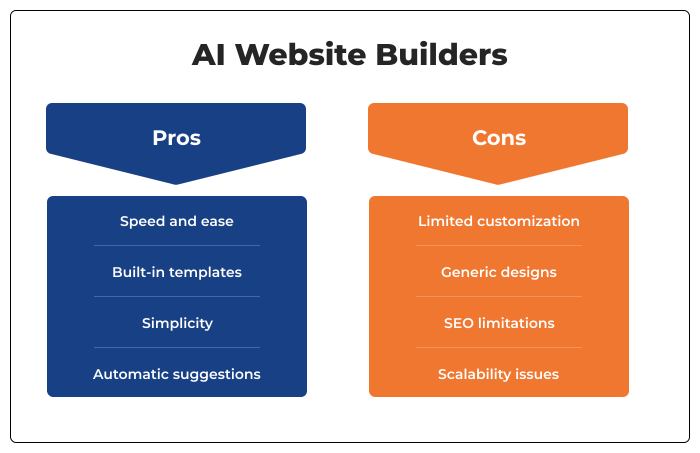
Pros: AI website builders are incredibly fast and easy to use, making them ideal for beginners. They can generate a full website design, layout, and content within minutes. With built-in templates, mobile optimization, and automatic suggestions, they simplify the entire process and reduce the need for technical knowledge.
Cons: However, these tools often lack deep customization options. The designs may feel generic, and users have limited control over structure and code. While good for basic SEO, AI builders usually fall short on advanced optimization and may not scale well for complex or growing websites.
7. Pros and Cons of Traditional Website Builders
Traditional website builders have been the go-to tools for years, offering users more control and flexibility. But with that control comes added complexity. Let’s explore the pros and cons.
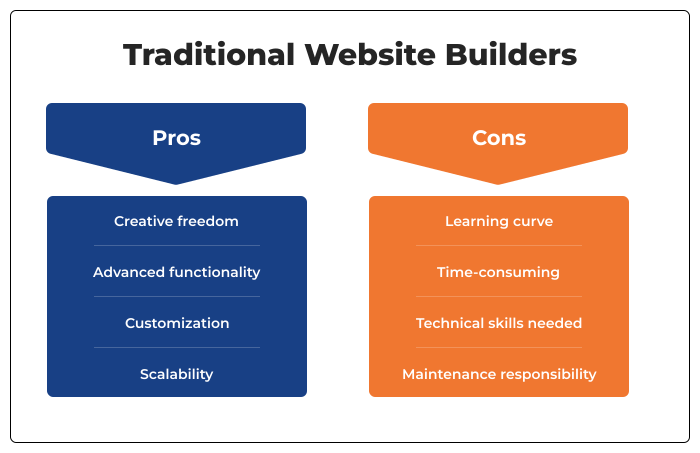
Pros: Traditional builders like WordPress, Squarespace, and Webflow give users full creative freedom. You can customize layouts, add plugins, tweak code, and optimize every part of the website for SEO. They’re ideal for users who want a unique design, advanced functionality, or room to scale as their website grows.
Cons: However, this flexibility comes with a learning curve. Setting up and customizing a site takes more time and often requires some technical know-how. Beginners may feel overwhelmed, and hiring a developer may be necessary for complex features. Additionally, ongoing maintenance like plugin updates or backups is often the user’s responsibility.
8. Cost Comparison
Understanding the cost differences between AI and traditional website builders is crucial when choosing the right platform. Let’s break it down into three key areas: setup, maintenance, and hidden expenses.
8.1 Initial Setup Cost
AI website builders are often more affordable upfront. Many offer free trials or low monthly plans that include hosting, templates, and even auto-generated content. You can launch a basic site for as little as $10–$20/month. In contrast, traditional builders like WordPress may require purchasing a domain, hosting, a premium theme, and possibly plugins raising initial costs to $50–$200 or more depending on the setup.
8.2 Long-Term Maintenance
AI platforms usually include updates, hosting, and security in their subscription, reducing ongoing work. Traditional builders, however, often require manual updates, plugin management, and security monitoring. You may also need to pay for developer help or technical support, especially as your website scales.
8.3 Hidden Costs
With AI builders, limitations in features or integrations can lead to unexpected upgrade fees. Traditional builders may have hidden costs like paid extensions, premium plugins, or third-party tools. Also, while WordPress itself is free, customizing it can involve recurring payments for add-ons, themes, or developer assistance.
9. When to Choose an AI Website Builder vs. a Traditional Website Builder
Choose an AI website builder if you need a website quickly and without technical or design expertise. These tools are ideal for solopreneurs, freelancers, small businesses, or hobbyists who want a clean, functional site with minimal effort. If your top priorities are speed, simplicity, and affordability—and you don’t need complex features or custom design—AI builders are a great fit. They’re especially useful for temporary sites, MVPs (minimum viable products), or landing pages. However, as your needs grow, you may find AI builders limiting in terms of advanced features or scalability.
- Best for quick, budget-friendly setups
- Ideal for simple sites like portfolios, MVPs, or one-pagers
- Limited in customization, integrations, and scalability
Choose a traditional website builder if you want full control over your site’s design, structure, and functionality. They’re better suited for growing businesses, eCommerce stores, or content-heavy websites that require more customization and flexibility. Traditional builders are ideal if you’re comfortable learning new tools or have developer support. They shine when SEO, scalability, third-party integrations, and unique branding are priorities. Although setup may take more time, the long-term benefits in performance and growth make them a smart investment for serious projects.
- Offers deeper customization and feature control
- Suitable for long-term scalability and SEO performance
- Requires more time, effort, or technical support upfront
10. Hybrid Approach: Can You Use Both?
Yes, combining AI and traditional website builders is a smart and practical approach. Many platforms, like Wix and Zyro, let you start with AI-generated designs and then switch to manual editing. This means you can launch quickly using AI and later customize layouts, content, and features to better fit your brand.
Alternatively, you can use AI tools separately for generating website copy, SEO suggestions, or layout ideas and apply them within traditional builders like WordPress or Webflow. This hybrid method offers the speed and simplicity of AI with the flexibility and scalability of traditional platforms, making it ideal for users who want both efficiency and control.
Final Thoughts: What’s Right for You?
Choosing between an AI website builder and a traditional one depends entirely on your current goals, technical confidence, and long-term vision.
- AI builders like Wix ADI or Durable are great for getting online fast with minimal effort ideal for freelancers, side projects, or quick MVPs.
- Traditional builders like WordPress or Webflow shine when you need control, scalability, and advanced customization perfect for content-heavy or growing business websites.
- Hybrid workflows let you start fast with AI and evolve your site over time using manual controls offering flexibility as your needs change.
Instead of choosing one forever, think of your website as a living asset that can evolve. Whether you prioritize speed, control, or both—there’s a solution that can grow with you.
Check out our latest blog on “The Rise of AI Content Creation: How AI Content Creation Tools & Platforms Are Changing the Game”